Controller & Rain Presets
Puddlecraft splits the rain into two halves. The Puddlecraft controller (one per scene) is the bridge between your weather and the rendering: it knows how hard it's raining and how wet everything is. How the rain looks lives somewhere else, in a Rain Preset asset, so you can swap the look or share it between scenes without touching the weather.
The controller
Add one with Tools > Puddlecraft > Create Controller. Its inspector has four tabs.
Weather
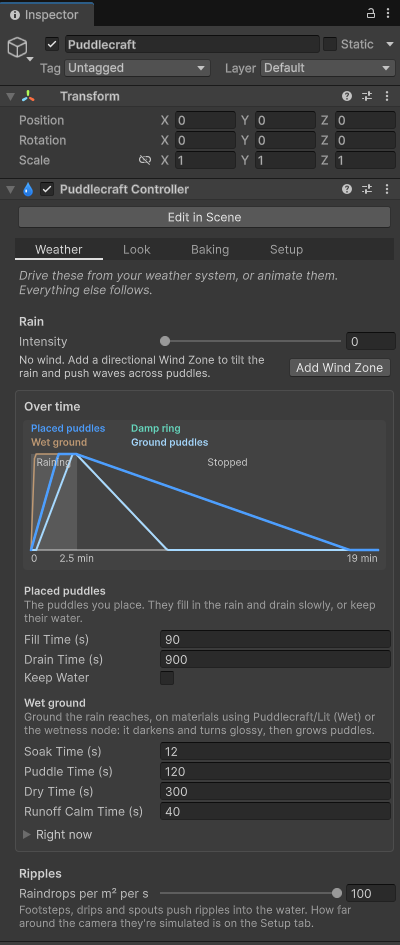
This is the tab you'll come back to most. It holds the intensity; how fast placed puddles and wet ground fill, drain and dry; and how fast runoff calms down. A graph of a shower shows what those timings add up to. Drive these from your weather system.
Wind comes from the scene's Wind Zone. If there isn't one, the tab gives you an Add Wind Zone button.
Everything in Puddlecraft follows one rain state:
- intensity;
- how full the placed puddles are, plus a high-water mark that leaves damp rings as they drain;
- how wet the ground is, and how far procedural puddles have spread over it;
- how hard water is running down slopes (Runoff), which follows the intensity with a lag.
One part of this trips people up. Intensity is how hard it rains, which means how fast water arrives. It isn't a level the water settles at. As long as it's raining at all, the ground keeps soaking and the puddles keep filling (more slowly in light rain) until they're full. A light drizzle all day still ends in full puddles. Nothing dries or drains until the rain stops, at intensity 0.
These values advance on their own in Play mode. You can also set them yourself to start a scene mid-storm or just after one, either in the inspector (Weather > Right now) or from a script through rain (see Scripting). Raising Placed Water past Damp Ring pushes the ring up with it. Wet Ground and Ground Puddles are independent, so puddles standing on dry ground are allowed.
Preview in Scene View shows rain falling around the Scene view camera in Edit mode. You'll find it here, in the Puddlecraft overlay, and at Tools > Puddlecraft > Preview in Scene View. It's off by default, and Unity remembers the setting between editor sessions.
| Setting | What it does |
|---|---|
| Fill Time / Drain Time | How long placed puddles take to fill in a downpour (longer in lighter rain), and to drain once the rain stops. |
| Keep Water | Placed puddles keep their water when the rain stops. |
| Soak Time | How long dry ground takes to soak through in a downpour (longer in lighter rain). |
| Puddle Time | How long procedural puddles take to cover the ground once it's soaked. |
| Dry Time | How long soaked ground, procedural puddles and damp rings take to dry. |
| Runoff Calm Time | How long the water running down slopes takes to calm once a downpour stops. It picks up four times faster when the rain gets heavier. |
| Raindrops per m² per s | How many raindrops land in a downpour; lighter rain has proportionally fewer. Each one makes rings on standing water that fade out over a couple of seconds. The renderer feature's Medium and Low quality tiers cap it at about 72 and 57. |
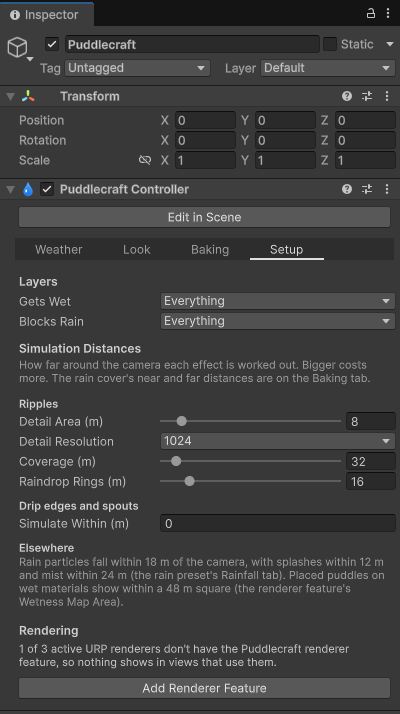
| Ripples Detail Area / Detail Resolution / Coverage (Setup tab) | The detailed square around each camera where footsteps, wheels, drips and spouts push ripples into the water, how detailed it is, and a wider, coarser square (half the resolution) that carries the ripples further out. Every camera runs its own simulation, the Scene view's included, so with split-screen or several players each one sees the ripples near it. The renderer feature's Low quality tier turns these ripples off. |
Look
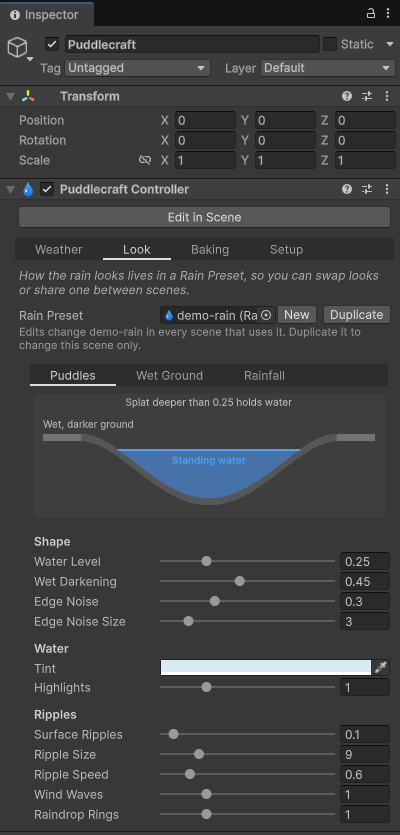
Which Rain Preset is in use. New and Duplicate save a preset next to the scene. With no preset assigned you get the built-in default look, minus the rain particles. The inspector warns you when the preset has no rain prefab.
Baking
Every bake in one place, each with a note on what it's for and its own button: puddles, rain cover, drip edges and spouts.
There's also a diagram of how the sky test decides where puddles can form. Rain Angle is the cone of sky that rain can arrive from. Max Slope is where placed puddles start to thin out: they fade above it and are gone entirely 10° steeper. Edit-time ray tracing always runs on compute shaders, so bakes come out the same on every GPU.
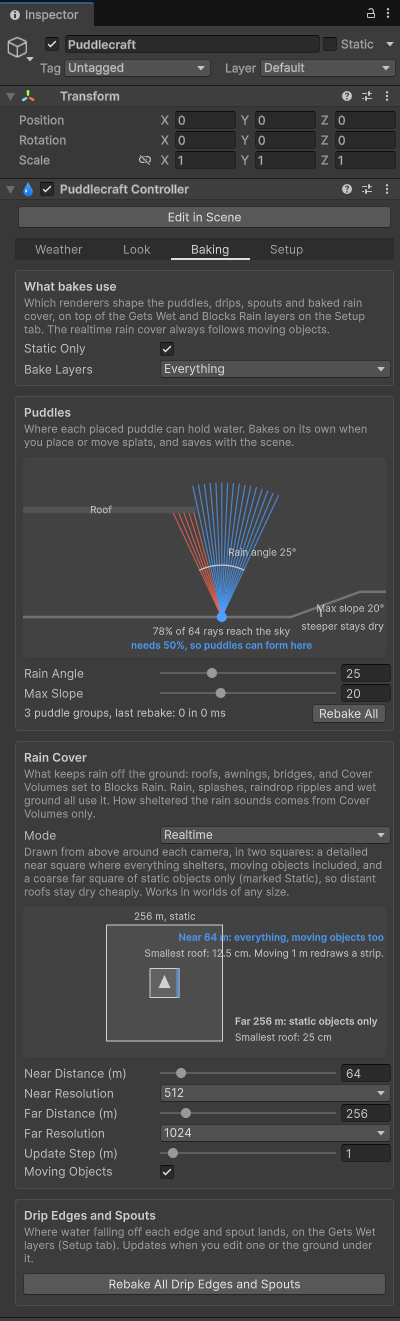
What bakes use, at the top of the tab, decides which renderers shape every bake (placed puddles, the baked rain cover, drip edge and spout landings) and the placement tools. It applies on top of the Gets Wet and Blocks Rain layers:
- Static Only (on by default): only renderers marked Static count. Cars, characters, doors and anything else that moves then don't shape the bakes from wherever they happened to be standing. Without this, a parked car would leave a dry, car-shaped gap in a puddle once it drives off. Mark roofs, ground and other fixed geometry Static, or turn this off.
- Bake Layers (Everything by default): leave a layer out to stop it shaping bakes. It still gets wet and blocks rain at runtime.
None of this affects the realtime rain cover, which always follows moving objects around the camera.
The rain cover settings live on this tab too; see Rain Cover.
Setup
The plumbing: which layers get wet and which block rain, how far around the camera ripples, raindrop rings, drip edges and spouts are simulated, and whether the renderer feature is installed.
Rain Presets
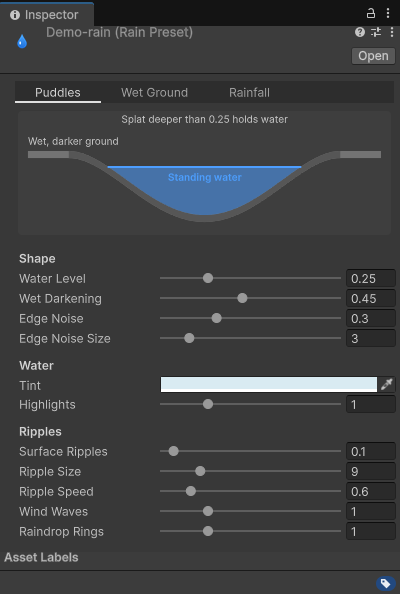
A Rain Preset (Create > Puddlecraft > Rain Preset) holds the look: puddle shape, water, ripples, falling rain and splashes, and wet ground. Drag one onto the controller to change the look, or use the same one across several scenes.
Puddles
How puddles and standing water look, in three groups:
- Shape: the water level a splat has to reach to hold water, how much darker the wet ground around it gets, and how ragged its edge is.
- Water: tint and highlights.
- Ripples: surface ripples, wind waves and raindrop rings.
Wet Ground
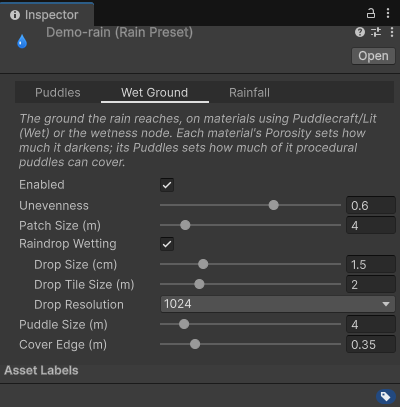
How rain wets the ground the sky reaches. That covers how unevenly it soaks and dries (Unevenness, Patch Size); whether it gets wet drop by drop (Raindrop Wetting, with the drop size, the size of the drop pattern and its resolution); how big the procedural puddles are (Puddle Size); and how far rain reaches in under a roof edge (Cover Edge). See Wet Ground & Materials.
Rainfall
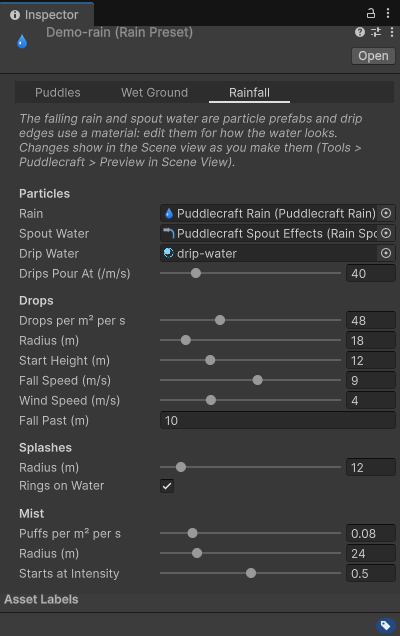
Falling rain and what happens when it lands: the rain and spout prefabs and the drip edge material; how many drops fall, how far around the camera and how fast; and the splashes, rings and mist they make.
Drop size and colour aren't here, though. They come from the particle system on the rain prefab.
Scene view tools
Splat outlines show in the Scene view while the Puddlecraft tools are active (Edit in Scene) or a splat is selected. Blue outlines add to the splats under them; teal ones keep whichever is deeper. The Heatmap button in the Puddlecraft overlay shows each splat's depth while you place them.
Wind
Wind comes from the scene's directional Wind Zone. Rotate it to set the direction; Main sets the strength (1 or more is full strength) and the Pulse settings make it gust. Wind tilts the rain, blows it in under roofs and pushes waves across standing water. No Wind Zone, no wind.
One catch in builds: the Wind Zone is looked up when a scene loads, and again if the one in use is disabled or destroyed. A Wind Zone you add at any other time isn't picked up until the next scene load. Scripts can read the wind from PuddlecraftWind.